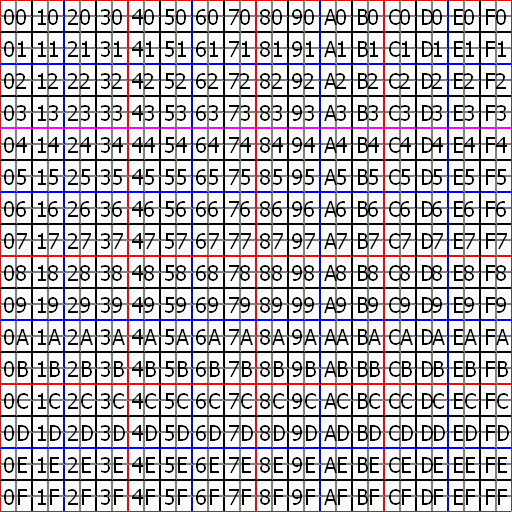
ROKURO Pro
- Scrupted Prim Previewer and Editor -
by Yuzuru Jewell(KANAE PROJECT) produced by youwith. 10/29/15
ROKURO Pro displays both the Sculpted Prim and its surface texture.
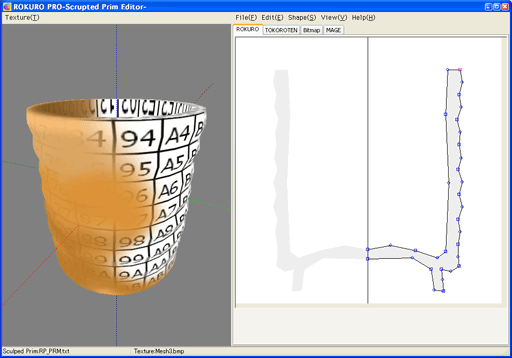
A sculpted Prim can be edited in the three modes: ROKURO/TOKOROTEN/MAGE. The three modes can be combined and used. Furthermore, ROKURO Pro can correct or adjust a coordinate for every control point in the BITMAP mode. For more information on the different modes, see below.
It is not guaranteed that a display of the prim in TATARA will be exactly the same as the appearance of the Sculpted Prim in Second Life.
ROKURO Pro was previously called AGARI. AGARI means tea to finish off the meal, and finishing.
Download
ROKURO Pro 3.0.62 (10/29/15)The trial period is for three days.During the trial period, you cannot export Sculpted Prim files. |
Win 32bit
Virus checked by NOD32 ver.12486. |
Coil plug-in 151029 [option] |
Win 32bit
Virus checked by NOD32 ver.12486. |
Gear plug-in 151029 [option] |
Win 32bit
Virus checked by NOD32 ver.12486. |
Cam plug-in 151029 [option] |
Win 32bit
Virus checked by NOD32 ver.12486. |
License
ROKURO Pro 3.X users can use their password.
ROKURO Pro 1.X, 2.X users need to purchase an updated serial box.
The Software is provided "AS IS," without a warranty of any kind.
In no case shall the author be liable for any damage or unwanted behavior of any computer hardware and/or software.
No Rental. Customer may not rent or lease the SOFTWARE to someone else.
All title and copyrights in and to the SOFTWARE (including but not limited to all images, photographs, animations, video, audio, music, text, and other information incorporated into the SOFTWARE), the accompanying printed materials, and any copies of the SOFTWARE, are owned by KANAE PROJECT.
The SOFTWARE is protected by copyright laws and international treaty provisions. Accordingly, Customer is required to treat the SOFTWARE like any other copyrighted material, except as otherwise allowed pursuant to this LICENSE and that it may make one copy of the SOFTWARE solely for backup or archive purposes.
Link
Operating environment
Windows Vista/7/8 64bit/32bit
Install & Uninstall
Install
There is no installer.
Uninstall
You can uninstall only by deleting the file called "ROKURO_PRO.exe".
How to use Preview
You can drag an object and can make it rotate.
You can change the scale of the object using the mouse wheel.
The Tabs in ROKURO Pro:
ROKURO
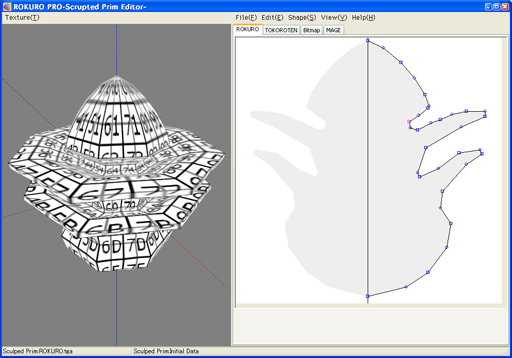
ROKURO is a Japanese turning lathe, a potter's wheel. ROKURO mode makes a solid lathe-type object.
TOKOROTEN
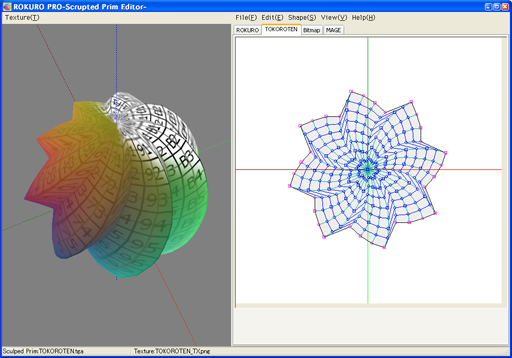
TOKOROTEN is Japanese extruded jelly. TOKOROTEN mode makes a pushed-out object.
Bitmap
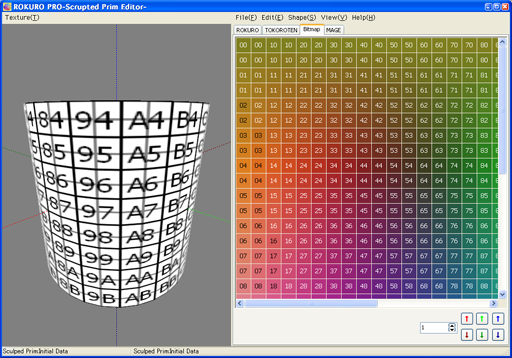
The control points can be adjusted in 1 pixel increments by changing the numeric value in the text box, then clicking on the boxes with the arrow on them.
MAGE
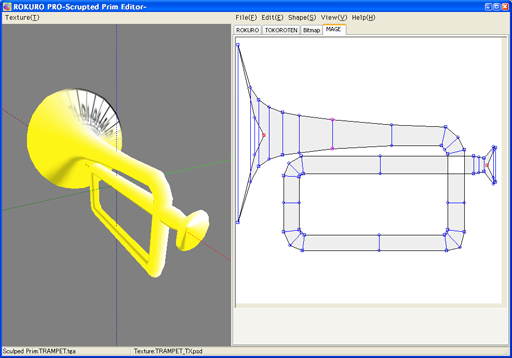
MAGE means bending in Japanese.
MAGE mode makes shapes similar to bent pipes such as neon tubes.
*Shapes using a combination of TOKOROTEN and ROKURO can be made.
However, these may not be entirely satisfactory.
How to use the Menus:
Texture Menu (On the far left of the menu bar)
- -Reset
- It returns to default texture.
- -Load
- The image which will eventually cover your shape will be loaded. The software resizes the file size to 512x512. The file types that can be used are JPEG/PNG/BMP/PSD.
File
- -New
- You can choose the aspect ratio of a sculpted prim from the following.
32x32(Default), 64x16, 128x8, 256x4, 16x64, 8x128, 4x256.
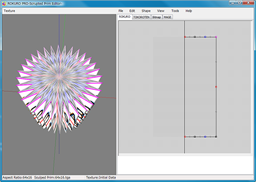
- -Load
- Sculpted Prim Texture is loaded from a bitmap or previously exported text. The form of the image which is available is .tga .jpg .bmp .png .obj .txt.
* The size of Sculpted Prim must be either of 64x64, 128x128, 256x256, or 512x512.
* There is no compatibility in an ROKURO and TOKOROTEN export file. Only ROKURO 33Point file is compatible.
* If you choose "Blender TGA File", it can read correctly the VU map that was output by Blender.
*You can't load Collada file. - -Save
- A sculpted prim bitmap (.tga), .obj file, and ROKURO/TOKOROTEN/MAGE export file is specified and outputted.
*An output sculpted prim bitmap's size is 64x64/128x128. .obj file can use Wings3D.
*You can save Collada file for Mesh of Secondlife. The same UV map as the sculpted prim is outputted. Only High of LOD is outputted.
When you select it, you can select following option.
- Hard Angle
- You can specify the hard angle of normal vector.
- The optimized vertices
- The vertices are optimized. Almost the same UV map as the sculpted prim is outputted.
- Save .dae and .obj file
- The optimized OBJ file is outputted together. Because the Collada file and the OBJ file use the same texture file, you can use it by SOMATO.
- -Setup
- You can set up Rotation Degree and Twist Degree. You can set up the TGA size of the file to save. I recommend 64x64. Copy Protection by transparency - When a Prim is made or modified, you can make it transparent to prevent the texture from being copied by screen capture.
- -Exit
- The program is ended.
Edit
When you choose more than one control point, the following function is available from a right-click popup menu. When you don't select any control points, the popup menu is not enabled.
- -UNDO/REDO
- There is a 256-step UNDO and REDO function.
- -Select All
- All the control points currently displayed are chosen. You may shift + click to choose points individually, or draw a box around the points you wish to select.
- -Rotate+
- A chosen control point turns counterclockwise around those centers of gravity.
- -Rotate-
- A control point turns clockwise around the center of gravity of the chosen control point.
- -Horizontal Align
- Chosen control points are lined up on the horizontal axis.
- -Vertical Align
- Chosen control points are lined up on the vertical axis.
- -Equal Intervals
- The interval of three or more selected control points is evenly arranged.
- -Twist+/Twist-
- An object is twisted. While displaying the TOKOROTEN tab, only the control point of the side is twisted.
- -Optimize(TOKOROTEN Mode only)
- The location of the control point which is inside is optimized.
- -Same width
- While displaying the MAGE tab, thickness of an object is made the same.(MAGE Tab only)
- -Flip
- The upper and lower sides of Prim are replaced.
Shape
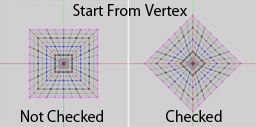
-An object is transformed into a multiple-sided pillar etc.
-Start From Vertex The angle which creates a polygon is changed.
View
- -Zoom
- You can expand the editing screen. You can also change the magnification by using the wheel of the mouse.
- -Grid
- You can overlay a grid. The control points will snap to the grid.
- -Display Background/Load Background
- You can place an image in the background of the editing screen.
The files types of the image which can be used are JPEG/PNG/BMP/PSD. - Level of detail
- The level of detail is displayed in three distances: Near, Middle and Far.
Tools
You can use the plug-ins which are in the same folder as this program.
When you use it for the first time, you have to register it.
*You can use plug-ins for ROKURO Pro 2.0.
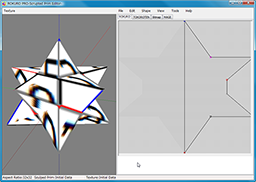
- -Polyhedron plug-in (Polyhedron.plg)
- You can choose ten or more kinds of polyhedrons.
*The aspect ratio of the map file specifies 32x32 automatically.
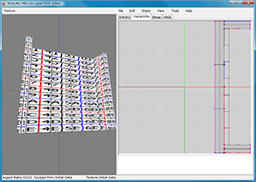
- -Stairs plug-in (Stairs.plg)
-
You can make the stairs of four types.
You can specify the number of steps for the stairs from 3 to 14.
You can specify the height of a sleeve (sides of stairs), if stairs with a sleeve are chosen.
*The aspect ratio of a map file specifies 32x32 automatically.
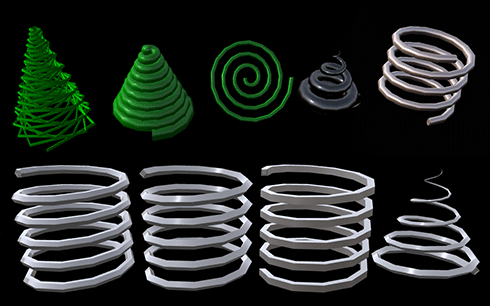
- -Coil plug-in (Coil.plg) [option] download
 total coils : You can specify the number of turns of the coil.
 Arranged : The coordinates of XY plane of vertexes are arranged.
 32x32 : You can specify the aspect rate of the sculpted prim.
 clockwize coil / anticlockwize coil : You can specify the direction which rolls the coil.
 shape : You can specify the form of the section of the coil.
 Rotated : You can rotate the form of the section of the coil.
 Crystallized: You can arrange a control point only on a vertex in the section of the coil.
 Width : You can specify the thickness of the both edges of a coil.
 Z Position : You can specify the height of the both edges of a coil.
 Diameter : You can specify the diameter of the both edges of a coil.
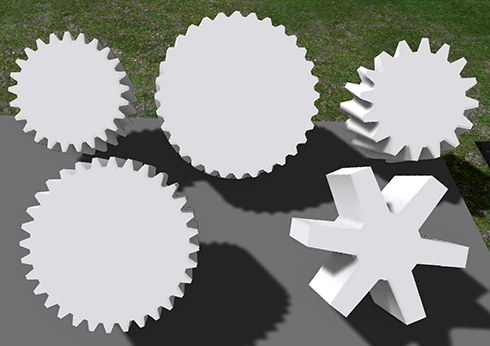
- -Gear plug-in (Gear.plg) [option]download
 Size : You can specify the aspect rate of the sculpted prim.
 Type : You can specify the type of gear from Normal Gear and Helical Gear and Double Helical Gear.
 z : You can specify z of the gear.
 Whole Depth : You can specify the depth of the Gear.
 Crystallized : The gear is crystallized.
 Maximized : The gear is maximized.
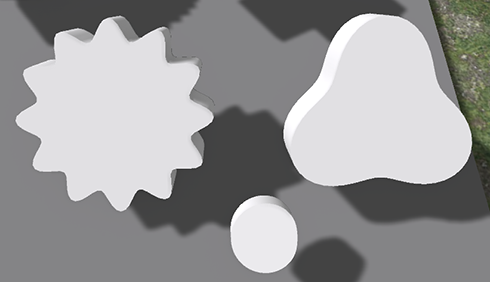
- -Cam plug-in (Cam.plg) [option] download
 Size : You can specify the aspect rate of the sculpted prim.
 Count : You can specify the number of the positions where the cam is high.
 Depth : You can specify the depth of the cam.
Keyboard Operation
- -Move
- If you push an arrow key, the selected control point is moved 1 pixel.
If you press the arrow keys and the Shift key simultaneously, it will move 8 pixels.
If you are displaying the grid, control points are moved per grid. A Shift key cannot be used.
Tutorial Video
You can see Tutorial Video from http://www.youtube.com/user/YuzuruJewell
History
10/29/15 3.62
-Corresponding to changes in the Windows OpenGL driver.11/19/11 3.0.60
-The function to save Collada Physics shape file was added.-The function to save Lowest LoD file was added.
10/01/11 ROKURO Pro 3.0.59
-The function of saving LOD Collada file corresponded to Mesh Release 2.07/25/11 ROKURO Pro 3.0.58
-The bug of the Collada output was fixed.-The bug of management of a Collada output option was fixed.
07/16/11 ROKURO Pro 3.0.57
-The option of "Save low/medium/high LoD" on Collada Option Dialog was added.You can save High/Medium/Low Level of Detail Collada files.
10/14/10 ROKURO Pro 3.0.55
-The syntax of Collada is described more strictly.-The maximum of the scale was changed to 64.
-The compiler and the OpenGL library were updated.
09/18/10 ROKURO Pro 3.0.54
Version 3.0 release12/01/08 ROKURO Pro 2.0.46
Version 2.0 release09/14/07 ROKURO Pro 1.33
First releaseTrial & Buy
A trial period is for three days. In the trial period, you cannot output Sculpted Prims.
When starting the software, a dialog box which asks for a serial code is displayed.
After the trial period has passed, it becomes impossible to start.
Please purchase Rokuro Pro Serial Box in KANAE PROJECT Shop.
Rokuro Pro Serial Box gives you your license code.
Credits
- -GLScene http://glscene.sourceforge.net/wikka/HomePage
- GLScene is released to the public as open-source under Mozilla Public Licence. http://www.mozilla.org/MPL/
Thanks to KJ Georgette for help with this Readme file.